Showing posts with label How-to. Show all posts

Wednesday, January 9, 2019

Etsy Quick Trick: free shipping plus 15% off

help for Etsy vintage sellers
Free shipping can be an effective marketing tool for vintage sellers

Have you tried free shipping? Many vintage sellers have expressed concern that free shipping is unattainable.


Will free shipping discourage multiple purchases?


My shop has free shipping. My shop also runs a 15% discount all the time off from purchases of three or more items. I have had a many takers.

Lots of vintage shops give volume discounts when asked; what I do is not much different. Shipping costs are rolled into the price... Multiple buyers get their "free" shipping cost back. They feel like they are getting a bargain to boot, a win-win!

Items with "sales" such as "15% off three or more purchases" receive another benefit: they show up on any Etsy search for items on sale.... (And of course searches with free shipping...) I get fewer requests for lower prices, too.


Etsy's take on free shipping

rural mailbox
Is free shipping viable for online sellers?


Etsy asked buyers, and
...They see no reason why they should pay more for shipping on Etsy than anywhere else...

There was a belief... that because Etsy is person-to-person that people would understand that and pay more shipping. The buyer research was definitive: They won't.
"They're willing to pay $50 for that beautiful product. But having to pay $10 for shipping felt wrong. In fact, it feels wasteful for them to pay for shipping when everywhere else they don't have to pay. We saw time and time again that if the buyer had to pay $60 for an item and shipping was free, they felt great about it. But if they paid $50 for an item with $10 shipping, they felt bad about it."


15% off sale setup


Go to Shop Manager -> Marketing -> Sales & Coupons

Select the black button in the top right corner "new special offer."

"Run a sale." % off, minimum order quantity = 3 (makes the sale shop-wide)

Pick a date range. Give your offer a name.

Review and confirm and you are done.

A percentage-off sale on Etsy can only be a maximum of 30 days. That means that I actually run 12 sales per year. I can set them up well in advance. They are named something like "201915off01" for January, "201915off02" for February and so on.


Case studies for offering a 15% discount along with free shipping


***Example 1: an 8-oz item along with 2 jewelry pieces.***

Estimated shipping built into the cost to cover the “free” shipping: $2.99 + $2.99 + $3.99 = $10.00

Actual shipping $4.38

Order cost $64.83
15% discount on that total was $9.83

The amount  of the discount was about what I had rolled into the prices toward shipping. In this case for the three items I spent about half of that on shipping ($4.38). So when receiving $9.83 off their purchase, my customer received in effect a 7.5% discount. Does that makes sense?


***Example 2: a $100 bracelet with 2 post cards.***

This buyer purchased 2 inexpensive post cards in order to secure the 15% off. How did it work?

Bracelet $99.99 + post card $0.75 + post card $0.49 = $101.23

15% off $101.23 is $15.18 taken from the total is $86.05

$86.05 + Shipping (post cards only; shipping is not free for them in my shop) $3.98

Order total $90.03

So my buyer got 10% off plus two post cards (which I consider to be of no value and I sent one more as an extra). The buyer did not have to contact me to ask for a discount, and I am pretty happy about the sale.


***Example 3: six lots of window glass ***

This buyer scored 10 lovely pieces of crackle glass.

$185.94 - $27.89 (15% off) = $158.05

Calculated into the item cost toward free shipping: $3 + $5 + $5 + $5 + $5 + $5 = $28 

Actual cost was $21.05 + $3.82 = $24.87 (I could not get all those pieces double-boxed into a box under 1 sq ft.) 

So essentially my shop gained $3 extra over the calculated shipping. My buyer scored a net 13.5% off. With an order that big, I would have given 20% had they asked. So I am happy, and so is my buyer!

eye candy vintage art glass
We love combined orders

What do you do with the savings?


When other sellers ask if I give shipping refunds, I answer "No, I keep it and pay it forward toward more free shipping."

People want to shop quickly. By being transparent and showing the full cost up front, we make their job of shopping easier.

Free shipping is a different business model... you need to wrap your mind around it. You make more profit if someone local buys your item, and less the further away they live.

15% off three items or more sweetens the deal all around!


Monday, July 23, 2018

Etsy Plus features: restock request setup & use


Etsy Plus new seller shop upgrade
Etsy Plus is now available to sellers
Have you tried out Etsy Plus yet?

I have... I cannot say that it is worth $20/month for me. The discounted subscription fee of $10/ month until the end of 2017 is reasonable... With a cost to my shop of $2/month with the credits, it is worth a try.

The banner features are of questionable value. But hey, why not try them out, right?

I already purchased my domain name (for this blog in fact). So I am not in need of that feature.

Restock request


I am most interested in the restock request. According to Etsy's promotional information, "When an item sells out, shoppers can sign up to be automatically alerted when it’s back in stock. See which sold out listings are most popular so you can plan your inventory."

So a potential customer can find out when I restock something they are interested in? Sounds interesting.

To see how it should work, go to my sold items and select an item. There is an orange button to "Let me know when it's back". "We'll send you an email when this item is back in stock."


restock request button on Etsy sold item
Restock request as seen on the item sold page


Restock request setup


First let us set it up. It is easy using the bulk editing tool. In your Shop Manager, go to your "listings" page. Click the "select all" button in the top left corner. (Click a second time to select everything in your shop if you like.)

The "Editing Options" box un-grays and you can select from some options that drop down. One is "Edit restock request option for listing." Select "yes" and "apply." Voila, done!

(You will want to do this for your sold items as well.)

screen shot of etsy shop manager
Setting up the restock request in your sold items using Etsy's bulk editor


Using restock request


Now comes the coolness. Go back to your Shop Manager, listings page. 

On each listing you will now see a little counter for each listing (Restock requests: 0). The best part? You can filter the listings in order of restock requests: high to low.

You can look to see which items to source because shoppers have indicated an interest.


view restock requests in shop manager
It is simple to view how many items have restock requests


Important note


For the restock notice to go out, you will need to renew the sold listing rather than make a new listing.

Follow up


My shop has yet to receive a real restock request. Sellers have this trial period from now until the end of the year.  That will be enough to tell me if this feature is alone worth the price.

It is possible that like some other features, Etsy Plus is better suited to handmade shops. Time will tell... I will let you know here!

(Here is Etsy's tutorial on how to use the Restocking feature.)

Wednesday, November 8, 2017

Etsy quick trick: convert listings to free shipping

Are you offering free shipping? I am. In fact, I decided to permanently convert most of my listings to free shipping.
Help to sell vintage on Etsy
Quickly convert individual items to free shipping

I went into each one and manually made the change. It took some time.

The back story is this: we moved recently. That is something that can be difficult for those of us who sell vintage. Why? Our buying far outpaced our selling.

We collected too much stuff. Moving and organizing it is a lot of work. Especially with a roomful if extra items laying around, mixed in.

Inventorying books for sale
Inventorying stock
I lost a couple of orders. Yikes. We decided it was time for a full inventory, pulling every item and checking it off a list. This was helpful, identifying some errors.

As we inventoried, I realized that I could convert many listings over to free shipping right then. I just needed to do it quickly while keeping up with the inventory process (my husband checking off items on a big Excel chart).

Eventually I was able to simplify the steps to make listings free shipping. There is a secret.

Set up a FREE shipping profile 


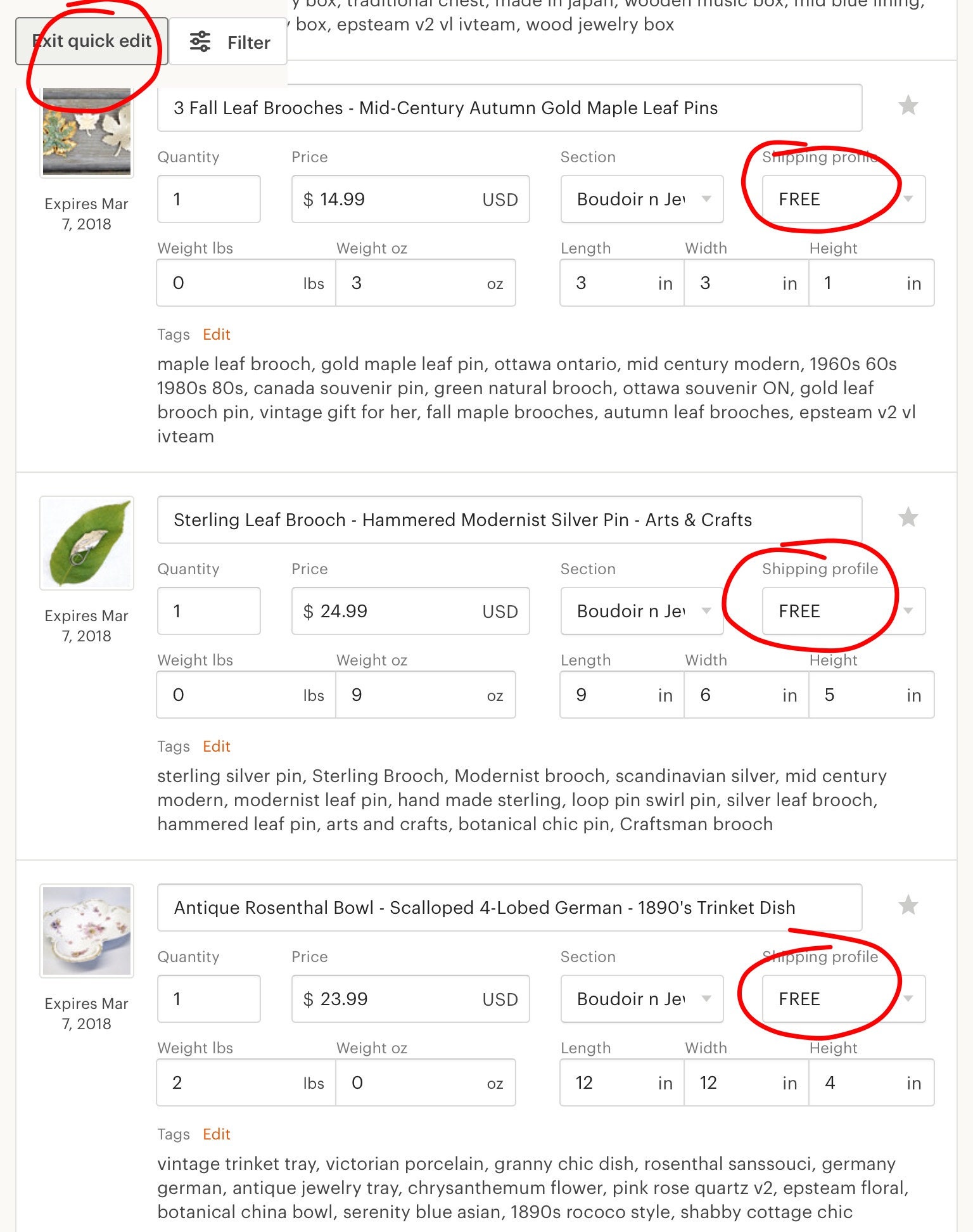
Set up a "free shipping" profile from within "Listings." Then it is easy to convert individual listings. Open it and then one click. Even easier, use the "Quick Edit" feature from within Listings.

Etsy quick edit feature for free listings
Switching is easy-peasy. Use the "Quick Edit" screen
For each item I ask myself, “is it under a pound?” If so, I add a little to the price. (I generally use price points.) Click the “FREE” shipping button. Done.

Doing it this way makes the change a permanent thing, not a limited-time promotion.

(Note that Etsy sets up a separate “sale” section to your shop. For some that is a disadvantage. Others prefer to have no added shop section.)

There, that was easy, right? Have a great selling day!

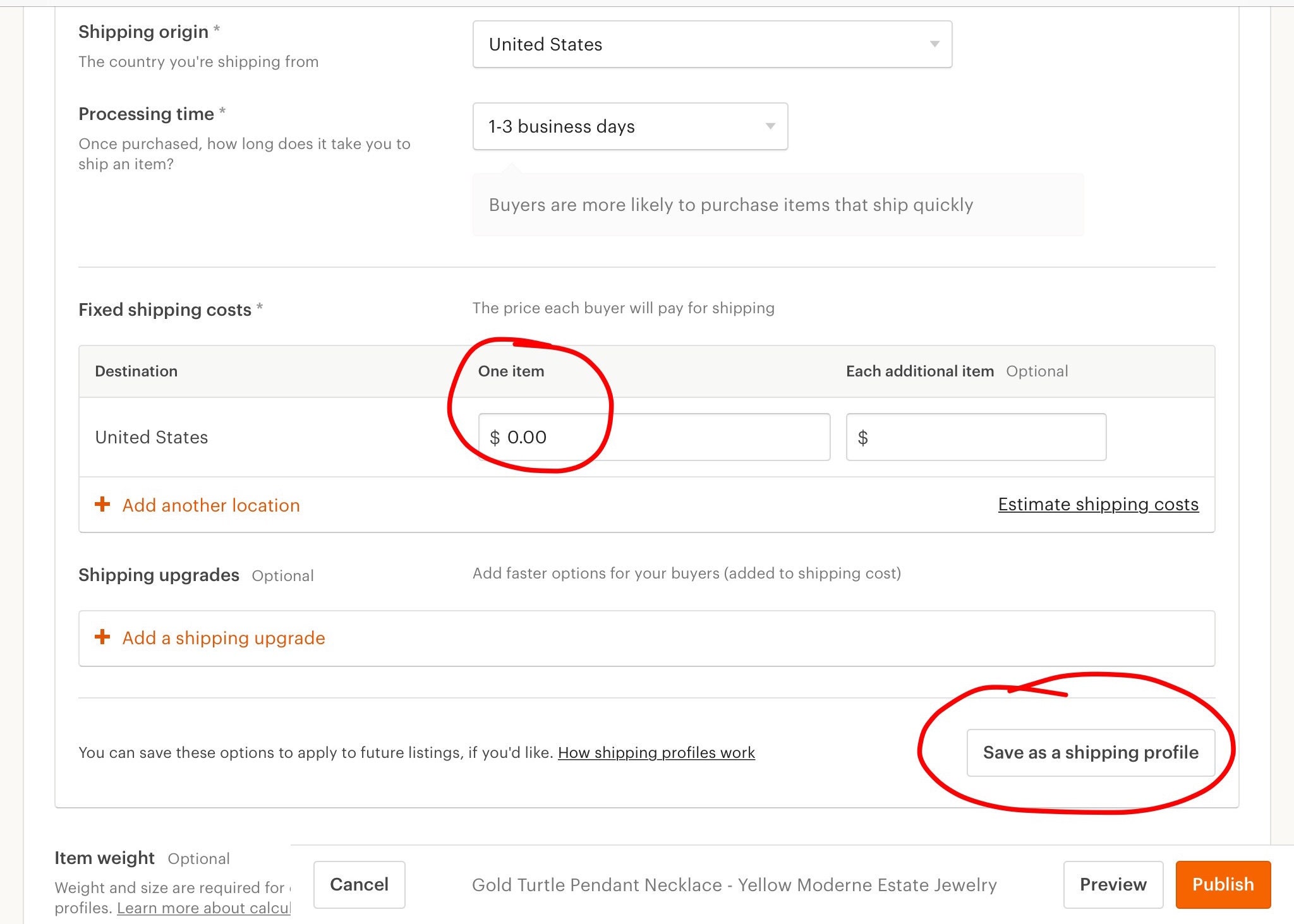
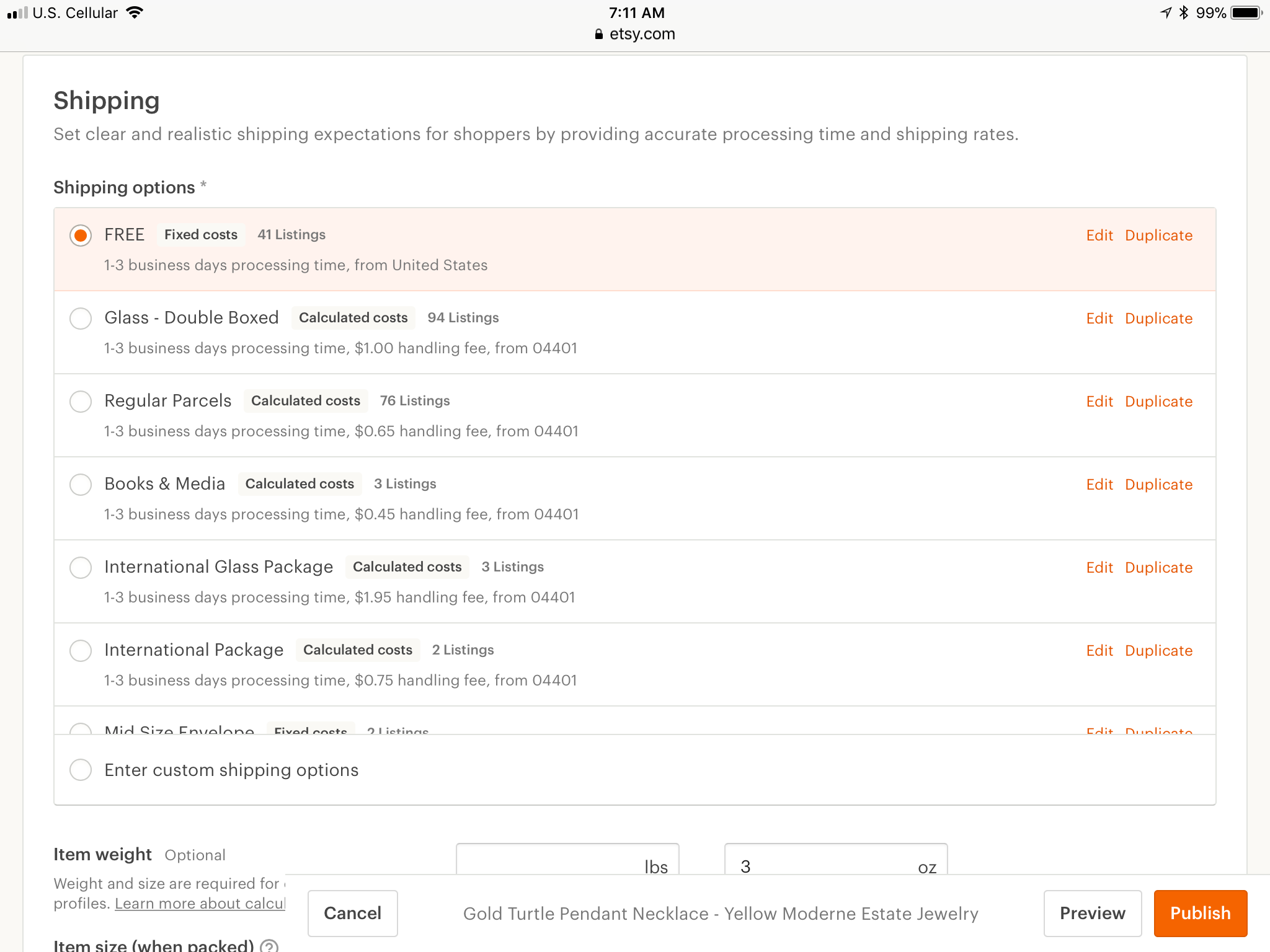
(More details in the screen shots below about how to set up a free shipping profile.)

A whole article here about how to switch.


Setting up new Etsy shipping profile
Setting up a Free Shipping profile
Etsy seller screen: using Free shipping profile
Using your new Free Shipping profile from an open listing

Thursday, September 28, 2017

Will you offer free shipping on Etsy?

Etsy is phasing in free shipping. It is optional for sellers. Buyers will start to be able to see free shipping on listings starting on October 9th.

Buyers will see a badge on individual listings. They will also be able to filter listings when performing a search.

offering free shipping on Etsy
Free shipping is not free for sellers
As with everything else, Etsy sellers have mixed opinions about participating. Some studies suggest that the conversion rate improves 90% when free shipping is offered. Etsy stated: "More than half of the buyers we surveyed in August said free shipping is a very important factor in their decision to purchase an item."

Free shipping can certainly be a powerful marketing tool. Do you shop on Amazon, using Amazon Prime? Or Wal-mart? Or eBay? Free shipping is not new.

Increased sales and a modest increase in fees are the up side for Etsy. (It will only be available in the USA.)

Free shipping affects the bottom line
Does free shipping improve your placement in search results? "Offering free shipping doesn’t change where your listings rank in search results... buyers will have the option to filter search results for listings offering free shipping."

Should I offer free shipping?


Of course, this is a business decision. Every seller needs to make an analysis of the benefits versus the cost of offering free shipping. It comes down to one thing: can your business still make money if you offer it?

How can you decide? Try testing out whether it works by offering it on some items and not offering it on similar items. See which items sell better. Analyze your profit margin, how much money you are making.

Do returns increase? Some sellers say that they do...

Offering free shipping is a business decision
Is the increase in sales enough to keep your shop making money? Making enough money?

Additionally, sellers should consider "the cost of offering free shipping as the cost of acquiring a new customer or retaining a loyal follower." There is some value to that, but how much?

Sellers can set a minimum order dollar value. They can also specify a minimum number of items in order to qualify for free shipping.

Etsy says that sellers can combine free shipping with another promotion (sale or coupon). "Eligible buyers will see both the free shipping and the other sale or coupon discount."

The best items for this type of promotion would be items with a relatively low shipping cost, of course.

Do you want to try it on some of your items?

A short how-to:


1.) To create a free shipping sale or coupon, go to Shop Manager > Marketing > Sales and coupons and click "New special offer."

2.) Specify which discount you would like to offer by selecting "Run a sale."

3.) Select "Free shipping" from the dropdown menu, fill out the rest of the details about your sale and click "next."

4.) Choose the listings you would like to include in the offer.

There. All done!
...................................................................................................................................
(Another way is to go to each listing and change it manually. Change the shipping method to "manual." Then, reduce the shipping to $0. In my case, I added most of the cost back on. However, I stuck to some price points... I was not rigid across the board with how I handled repricing.)

Here is a quick trick I discovered.

Here are more strategies from Etsy for offering free shipping.

Sunday, January 29, 2017

Promoted Listings: Step by Step


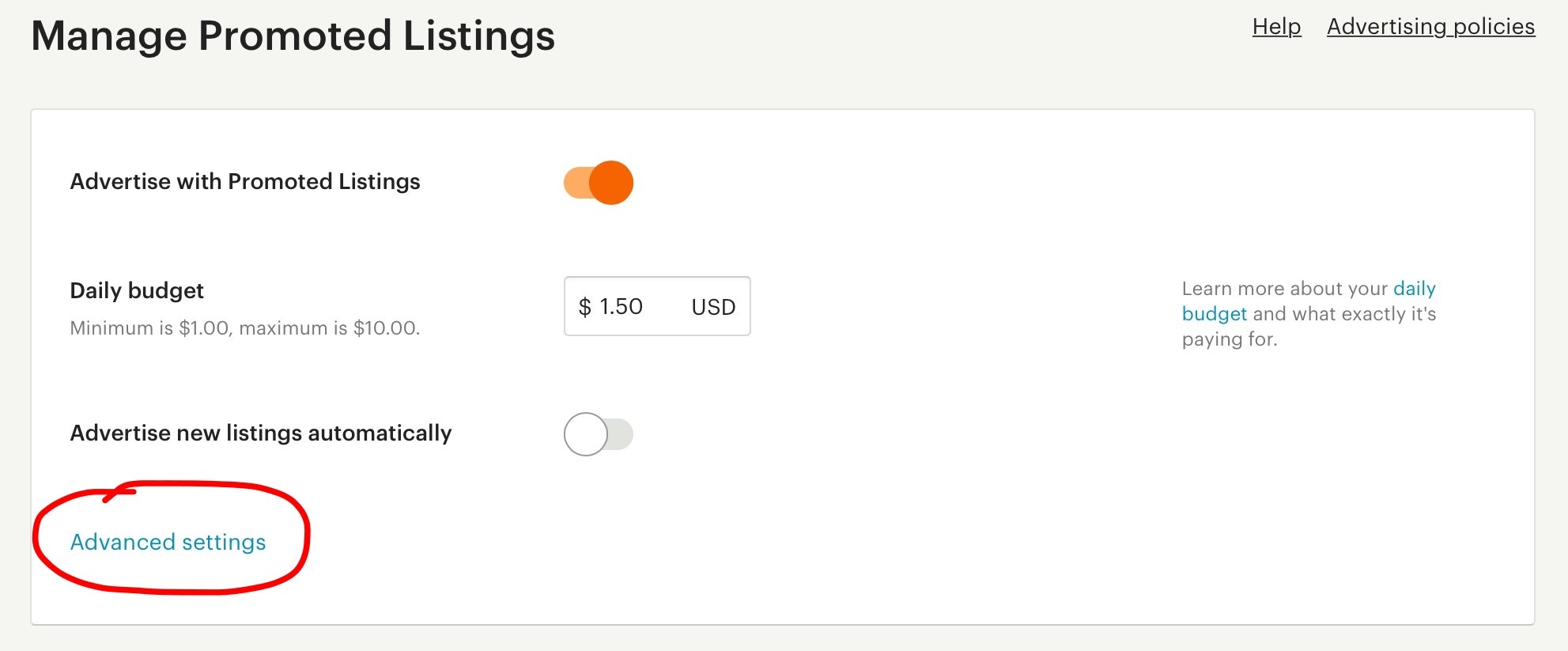
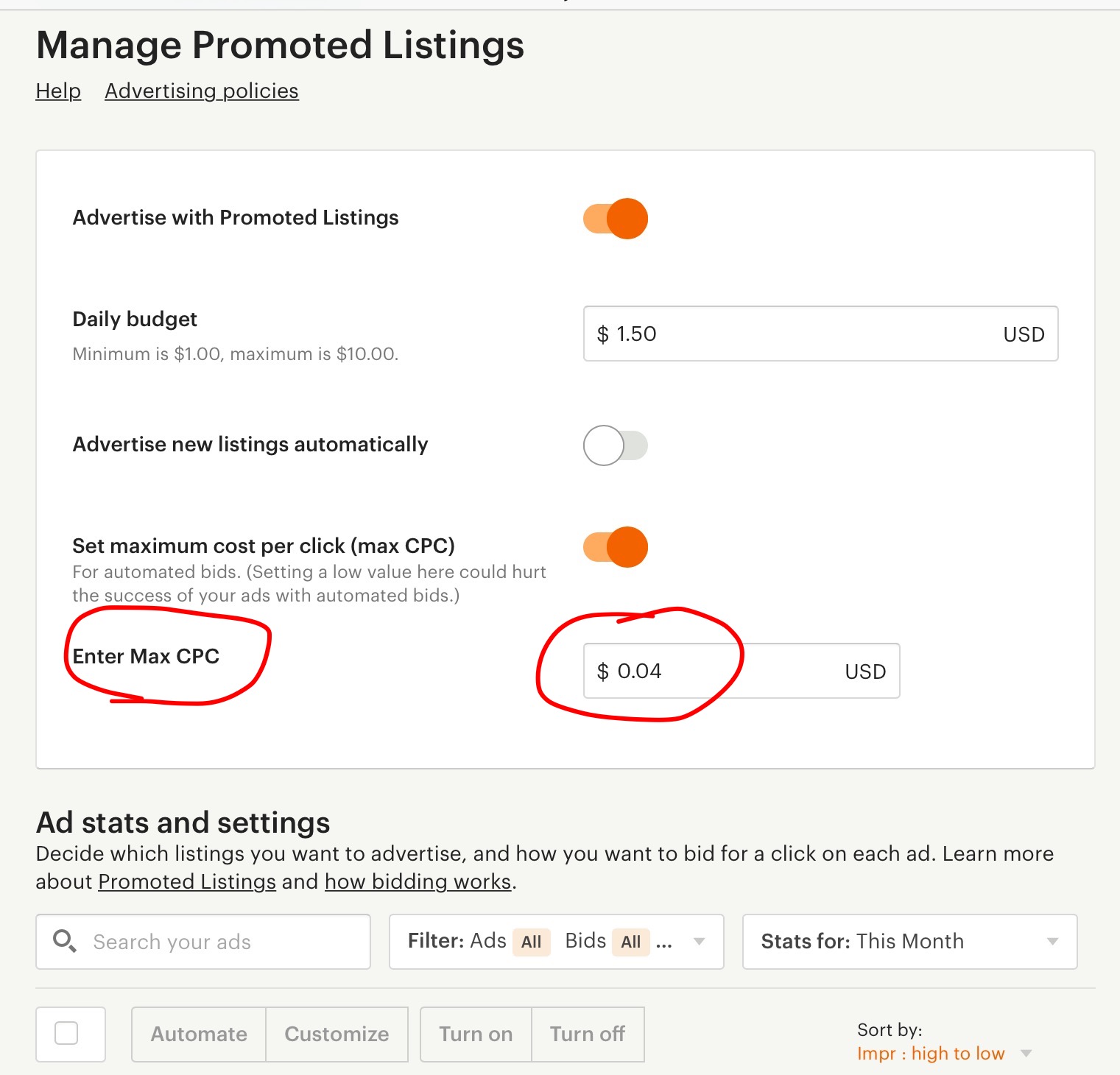
Manage Promoted Listings Advanced Settings
Select Advanced Settings to set your maximum bid
It is 2017. You have done some research and decided to go ahead with Etsy's Promoted Listings. Open the sign-up page. Go ahead, push the orange button. There, you are advertising!


Etsy seller advertising interface
Enter your maximum CPC right away. It can be as low as 1 cent
Set an overall maximum bid right away. Push the "Advanced Settings" button. (Right below "advertise new listings automatically.") Set a maximum bid (called Max CPC). Setting an upper cap on the price you pay for ads can avoid some expensive browsing... You big spenders can set it as low as 1 cent.

Click "manage" (illustrated below) and you see the big table with your listings. It asks if you want to advertise new listings. (I add mine manually but my reason for that is not a huge deal.)

You can advertise specific items and not others by toggling the orange buttons on and off. Likely some items for sale need more exposure, while others do not. 

Setting Bid Prices


After the initial set up, now it is the time to adjust bid prices. If your shop is small, it is easy. If your shop is large, this may take some time. Or you can just leave everything at the same bid.

When you set your low bid price for some items, you may see a little exclamation point. That indicates that the bid price virtually never reaches that (low) level. In that case, the item is unlikely to be seen for that bid, but it is not impossible.

You will be pleased to note that your bid for the advertising space can be lower than your maximum bid. For example, I have some jewelry items where my bid was 5 cents, but they only charged me 1 cent for a view. That indicates that the bidding process is like eBay where you put your max but what you pay can be less. If I put a lower number than they suggest I still can get some placement. Perhaps not at the top of the first page, but increased visibility nevertheless.

I am amazed that a competitive market like jewelry can have such a low bid price compared to post cards and photos. Odd. It has to be simply how much the sellers want to pay to advertise, how competitive Etsy's promoted listings are for that category, those keywords.

Reading the data


After a few days, open your advertising dashboard. A link is in your shop drop-down menu.

Your dashboard gives an overview of how the advertising campaign is going. Impressions each hour or each day give you an idea of the ups and downs of Etsy searching. Are searches up or down during the Super Bowl?

manage advertising campaign
Advertising dashboard. Manage button circled in red.
Has your campaign run out of money before the end of the day? Did you lift the cap, lower your bids, or just let it run out before 12 PM?

Push your Manage Promoted Listings button as shown. A chart or table of your items can be seen with all sorts of interesting information. We will discuss that in a future installment.


Friday, October 28, 2016

Shop updates - are you missing out?

Etsy's Shop Updates have been around since the end of 2015. How have they worked for you?
It seems that a lot of sellers don’t take full advantage of this great tool. Do many still lack mobile devices? Or is it because sellers don’t see the point? 
NYC skyline golden sunrise

 Why should we do shop updates?

Shop updates in my mind take the place of treasuries. (Admittedly, they are not as much fun.) Shop updates appear on the front page, increasing the exposure of our shop. We can upload photos of our items and other associated pictures and market our shop. It's a golden opportunity to show our creativity, and make a connection with the followers of our shop. 
Shop Updates appear on our Home Page
Shop Updates can be viewed in two prominent spots: 

1. On our Home Page. 
2. Next to our About Page.

Between our reviews and About Page.
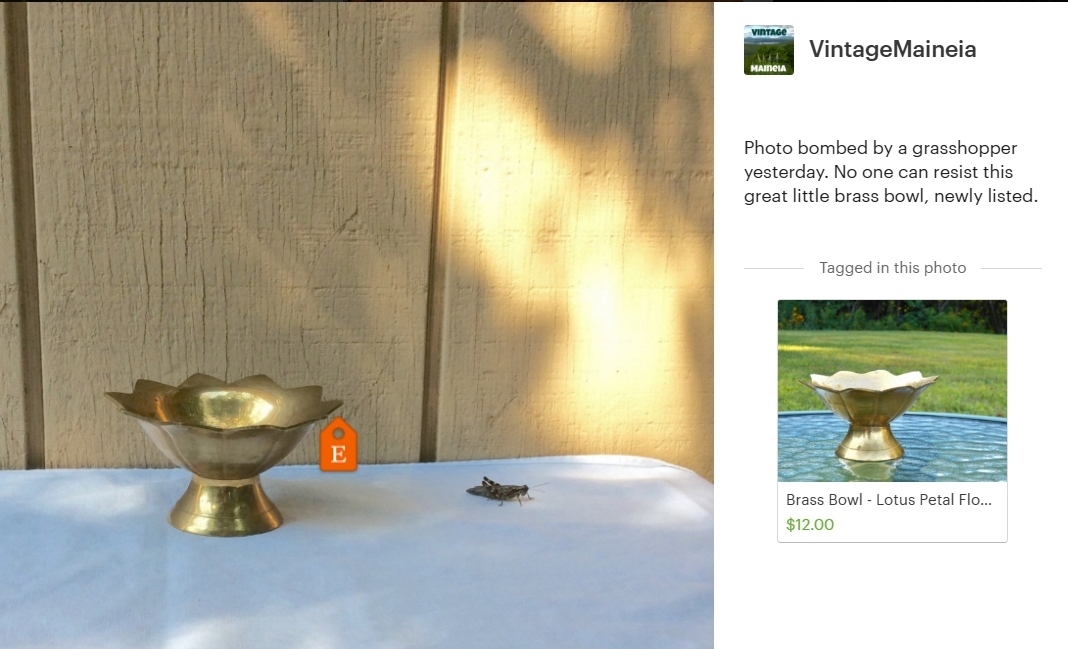
Brass Bowl grasshopper photo bombThey represent our shop, our brand. Shop Updates can build trust as to the authenticity or our shop, our love for vintage, our seriousness as a vintage seller.
We all have the opportunity to tell our shop’s story on a day-by-day basis. Isn’t that better than just once? At the same time, we can share our Shop Updates on some social media channels. It is a mini-blog, a form of shop promotion.
You will see shop updates from a shop if you:
Trinket dish in grass with flower petals1.      Favorited the shop.
2.      Favorited an item from the shop.
3.      Bought something from the shop.
4.      Own the shop.
If you're at all active browsing on Etsy, you will have updates coming through your feed. If you don't like a particular shop's updates, just shut them off (three little dots in one corner).

In my shop, I notice that featured items have a higher rate of selling. Other sellers feel the same. Perhaps our shops get a little bump up when we post. Or perhaps it is just the extra exposure our item receives.

How to post an update

You must have a mobile device that runs on iOS or Android. The alternative is to load an Android emulator on your PC (something like BlueStacks).
1.      Open "Sell on Etsy" app on your smartphone or tablet.
2.      Select "Shop Updates" in the menu (top left corner).
3.      Push the blue bar that appears across the bottom.
4.      “Take photo” or “choose existing photo.”
5.      Pinch and zoom. You can tweak your photo. (You will want to do any major editing before this step.) Select “next” in the top right corner.
6.      Tap the photo is the spot where you would like the orange Etsy tag to show.
7.      Select the item from your shop that you wish to promote. (Occasionally there are issues with this step. I have had to delete and reload the Sell On Etsy app a few times because this step failed to work.)
8.      Adjust the tag placement if necessary.
9.      Type a sentence or two that addresses “What is happening in this photo?” Be brief and upbeat.
10.   Push the blue bar, “Share on Etsy” which publishes it.
11.   A screen gives you the option to share your post on social media pages (Facebook, email, SMS and "Copy"). 
It's all done. Wasn’t that quick and easy?

Shop Update Visibility
Shop Updates show up on your feed from shops you have favorited or bought from. They are also part of our shop’s front page. Shop Updates are positioned between your reviews and About Page.
On your feed, you can hide certain updates, or all updates from a certain shop. (I do that if a shop just posts the same pic of their item that is on the listing or I don’t like their stuff, or if they just post too many updates in a row.) Look for three dots on the bottom right corner of the update you want to hide.

Ideas for Updates
Etsy is a venue designed for creative enterprises. It can seem daunting to come up with ideas for vintage shops. See dozens of ideas for vintage sellers here. 

How Often?

screenshot of view sources within Etsy
Etsy Traffic (right column)
Some sellers post updates rarely, less than once per month. How often do you want to appear in the feed of interested shoppers? I’ve seen a shop post four updates right in a row (Too annoying. I just deleted it.)
Some shop owners object to seeing their own updates in their feed. However, Etsy is letting us see how our updates fit into the rhythm of the feed. How often does your Shop Update feed refresh? I’ve read that once every 2-3 days is a goal to try. I actually aim for once per day, but sometimes miss.
screenshot of selling patterns
Shop Overview Dashboard. Look for patterns.
It may seem like common sense, but I recommend placing your Etsy tag as close to the item as possible or even on it. We wouldn’t want our featured item to be removed from the photo during any cropping.

Hashtags

Using hashtags in our shop updates may improve our post if we plan to publish it across certain social media channels.


Edit or delete later


Sometimes it is necessary to edit or delete a shop update after posting it. To do that, open the Sell on Etsy app. Select the post. Your options appear when you tap the three dots in the top right corner display: delete, edit caption, move tag or share.

Stats

Shop update stats show up in two places:
2. Shop overview dashboard. Hold your cursor over days/months(/even hours). Below the chart it will tell you how many shop updates within that period.

Selling vintage in uncertain times

With coronavirus, we have seen supply chain disruptions, stock market fluctuations, even companies temporarily stopping business. The news s...