Showing posts with label Shop Updates. Show all posts

Friday, December 30, 2016

How is your shop doing at the end of 2016?

How was 2016 in our shop? We all know about our gross sales. What about the other numbers?


item views graph screen shot

⇚Views in general

My views aren't great. However, that didn't seem to decrease my sales. My shop set all-time records in November and December. 

graph 2016 Free Google Shopping ads

Google shopping⇛

Etsy announced a seller upgrade in late 2016: we can now set up our own Google shopping engine advertising campaign. It's a paid service. I haven't participated. Etsy is tapering off the free ads for sellers. This year shows a steady decline in my Google Shopping views.

2016 Etsy app traffic graph

⇚Etsy app

I am seeing more and more views via the Etsy app. We all need to optimize our shops for buyers using the app to shop. 
2017 vintage shop stats

Shop updates⇛

In October of 2015, Etsy released Shop Updates. Yes, you need a mobile device running the Sell on Etsy app on iOS or Android. I do feel that they improve the sales rate of featured items.

That's quite the bump in shop update views in October of 2016. I think it was my first post on this blog which covers 40 shop update ideas for vintage shops. I also published one on how and why to do the updates at the end of that month.

In this screen shot you can also see what items were viewed. I'm including it because I've read that you can't see which of your shop updates brought in viewers, but you can.

So, how was 2016 for your shop? What are your stats telling you? Are you making any changes?

And what changes are coming in 2017?

Friday, October 28, 2016

Shop updates - are you missing out?

Etsy's Shop Updates have been around since the end of 2015. How have they worked for you?
It seems that a lot of sellers don’t take full advantage of this great tool. Do many still lack mobile devices? Or is it because sellers don’t see the point? 
NYC skyline golden sunrise

 Why should we do shop updates?

Shop updates in my mind take the place of treasuries. (Admittedly, they are not as much fun.) Shop updates appear on the front page, increasing the exposure of our shop. We can upload photos of our items and other associated pictures and market our shop. It's a golden opportunity to show our creativity, and make a connection with the followers of our shop. 
Shop Updates appear on our Home Page
Shop Updates can be viewed in two prominent spots: 

1. On our Home Page. 
2. Next to our About Page.

Between our reviews and About Page.
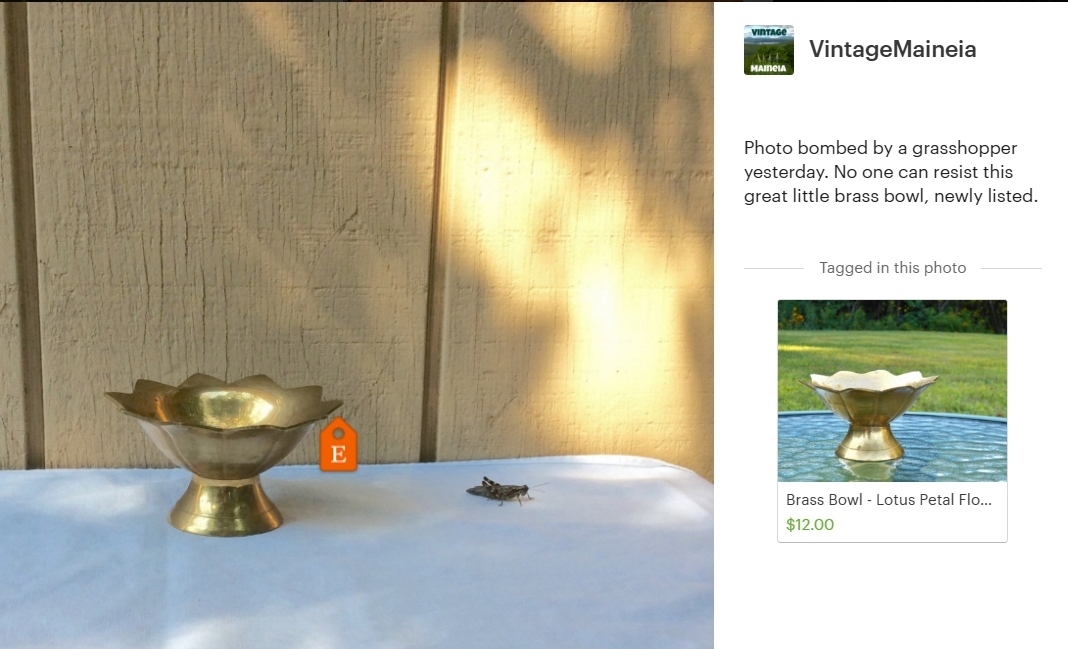
Brass Bowl grasshopper photo bombThey represent our shop, our brand. Shop Updates can build trust as to the authenticity or our shop, our love for vintage, our seriousness as a vintage seller.
We all have the opportunity to tell our shop’s story on a day-by-day basis. Isn’t that better than just once? At the same time, we can share our Shop Updates on some social media channels. It is a mini-blog, a form of shop promotion.
You will see shop updates from a shop if you:
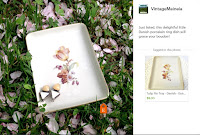
Trinket dish in grass with flower petals1.      Favorited the shop.
2.      Favorited an item from the shop.
3.      Bought something from the shop.
4.      Own the shop.
If you're at all active browsing on Etsy, you will have updates coming through your feed. If you don't like a particular shop's updates, just shut them off (three little dots in one corner).

In my shop, I notice that featured items have a higher rate of selling. Other sellers feel the same. Perhaps our shops get a little bump up when we post. Or perhaps it is just the extra exposure our item receives.

How to post an update

You must have a mobile device that runs on iOS or Android. The alternative is to load an Android emulator on your PC (something like BlueStacks).
1.      Open "Sell on Etsy" app on your smartphone or tablet.
2.      Select "Shop Updates" in the menu (top left corner).
3.      Push the blue bar that appears across the bottom.
4.      “Take photo” or “choose existing photo.”
5.      Pinch and zoom. You can tweak your photo. (You will want to do any major editing before this step.) Select “next” in the top right corner.
6.      Tap the photo is the spot where you would like the orange Etsy tag to show.
7.      Select the item from your shop that you wish to promote. (Occasionally there are issues with this step. I have had to delete and reload the Sell On Etsy app a few times because this step failed to work.)
8.      Adjust the tag placement if necessary.
9.      Type a sentence or two that addresses “What is happening in this photo?” Be brief and upbeat.
10.   Push the blue bar, “Share on Etsy” which publishes it.
11.   A screen gives you the option to share your post on social media pages (Facebook, email, SMS and "Copy"). 
It's all done. Wasn’t that quick and easy?

Shop Update Visibility
Shop Updates show up on your feed from shops you have favorited or bought from. They are also part of our shop’s front page. Shop Updates are positioned between your reviews and About Page.
On your feed, you can hide certain updates, or all updates from a certain shop. (I do that if a shop just posts the same pic of their item that is on the listing or I don’t like their stuff, or if they just post too many updates in a row.) Look for three dots on the bottom right corner of the update you want to hide.

Ideas for Updates
Etsy is a venue designed for creative enterprises. It can seem daunting to come up with ideas for vintage shops. See dozens of ideas for vintage sellers here. 

How Often?

screenshot of view sources within Etsy
Etsy Traffic (right column)
Some sellers post updates rarely, less than once per month. How often do you want to appear in the feed of interested shoppers? I’ve seen a shop post four updates right in a row (Too annoying. I just deleted it.)
Some shop owners object to seeing their own updates in their feed. However, Etsy is letting us see how our updates fit into the rhythm of the feed. How often does your Shop Update feed refresh? I’ve read that once every 2-3 days is a goal to try. I actually aim for once per day, but sometimes miss.
screenshot of selling patterns
Shop Overview Dashboard. Look for patterns.
It may seem like common sense, but I recommend placing your Etsy tag as close to the item as possible or even on it. We wouldn’t want our featured item to be removed from the photo during any cropping.

Hashtags

Using hashtags in our shop updates may improve our post if we plan to publish it across certain social media channels.


Edit or delete later


Sometimes it is necessary to edit or delete a shop update after posting it. To do that, open the Sell on Etsy app. Select the post. Your options appear when you tap the three dots in the top right corner display: delete, edit caption, move tag or share.

Stats

Shop update stats show up in two places:
2. Shop overview dashboard. Hold your cursor over days/months(/even hours). Below the chart it will tell you how many shop updates within that period.

Wednesday, October 5, 2016

Shop updates - over 40 ideas for vintage Etsy sellers

antique coin silver spoons Dicentra Eximia
Still-life
Etsy shop updates are like a mini-blog. They are an opportunity to market your items to potential buyers. The more updates you post, the more often you appear on the front-page feeds of those who like your shop. Also, you can share your updates to social media channels. They link back to your item, making it easy for shoppers to make a purchase from your shop.

Etsy wants you to use images that aren't the same as our five listing images… What a great opportunity to showcase your brand. And exercise your creative side!

Over 40 shop update ideas for vintage shops:
San Marzano tomatoes from Maine
In use in a seasonal way
  1. What is your inspiration? A barn shop? Grandma’s place? Your own collection? Show it.
  2. Post a pic of your vehicle full of new finds. Or as you unload them. Or as you clean them.
  3. Post a shot of an auction, sale or home where you pick your items.
  4. Show off new (or old) finds in an interesting group of color(s) or style(s).
  5. Showcase your photo booth or where you stage your items for photos. Did something unusual ever happen?
  6. Photograph your items stored in an interesting way. Try a wide angle.
  7. Demonstrate ideas for styling and/or using your items.
  8. Showcase your items for sale in or on other venues, like your shop or at a show.
  9. Simplest approach: "just listed is this great..."
  10. Take more item shots than you think you will need for listings. Use the extras for shop updates.
  11. Is your home decorated with items in the style that you sell? Can you artfully stage an item in your home and post that?
  12. Show an aspect of your life that might be interesting to others and relate to your vintage shop.
  13. Make artisticstill-life compositions of items for sale. Photograph and post them. Recombine items for sale.
  14. Stage your item in a seasonal setting. (This is my favorite.)
  15. Showcase your item in use.
  16. Where’s Waldo? Bring items on vacation and photograph them in interesting places. (I took some jewelry shots with a NYC skyline view while visiting.)
  17. Seasonal inspiration of items – fall scene with fall colored item, snow scene with a winter piece.
  18. Re-photograph shop items with a different background, on a rainy day, or in a different season.
  19. Show off your customer's photos of the item.
    shop update example using textured filter
    Shop Update photo using a rustic Filters app
  20. Item needed: place an Etsy tag on the spot where your item could be.
  21. For a vintage souvenir, feature a photo of the place it came from. 
  22. Showcase your partner, kids and/or pets with your items.
  23. Color match your items to something seasonal, especially seasonal Pantone colors. Or color match your items to each other.
  24. Show your packaging area.
  25. Post a picture of an item gift wrapped or ready for shipping.
  26. Show any extras you send.
  27. Offer those who have favorited your shop a “Thank You”coupon code. See how many use it.
  28. Reward previous customers with a coupon code. (How many use it?)
  29. Celebrate a certain number of sales, items in your shop or feedbacks with a coupon code.
  30. Compose a graphic shop announcement about your upcoming vacation (even a new baby!)
  31. Post a screen shot of your latest 5-star review.
  32. Post a link to your latest blog post or other SM activity.
  33. Post a screen shot of a newly stocked shop section.
    treasury style Etsy shop update
    Treasury-style update. I even repeated my photo!
  34. Highlight a picture of your item in a magazine, blog, movie or television presentation.
  35. Post a screen shot of your items on a Pinterest board, Facebook or Instagram post.
  36. Post a photo collage of related items in your shop.
  37. Use some special effects on a nice secondary listing photo. This works well for simple retro items.
  38. Tie an interesting photo with an item you have for sale. 
  39. If you are hankering for treasuries, make your own. Use a grid on Canva to feature your items all together. 
  40. Showcase a gorgeous close-up detail of a piece.
  41. Post a map (vintage, weather, etc.) with your location tagged.
Additional points I keep in mind:
Maine farm scene
Seasonal color feature
  • Have a variety of photos available from which to choose
  • Have something brief to say about the item
  • Vary the look of your photos
  • Don't use the lead photo from the listing
How do you do a shop update? That's the subject of another post.


Maine raised garden in early spring
Item staged in a different seasonal environment

Selling vintage in uncertain times

With coronavirus, we have seen supply chain disruptions, stock market fluctuations, even companies temporarily stopping business. The news s...