Showing posts with label Apps. Show all posts

Tuesday, December 4, 2018

Shipping integration Pirate Ship is free... it just may save your Etsy shop some money

Pirate skull and crossbones inside stamp
Pirate Ship is the new shipping app on the block

Have you tried Pirate Ship for shipping?


Arrrrgh, there is a new shipping integration afoot.

I admit it: I was skeptical at first. Pirate Ship seems TGTBT. After all, Etsy already gets commercial rates.

However, the "commercial" USPS rates that Etsy (and eBay and Amazon) pass on to third-party sellers is not the cheapest rate (called "Commercial Plus.")

How does an online seller tap into the lowest shipping rates without spending a monthly fee?

I think I have found it: Pirate Ship.


There are lots of things to like


Pull up a screen and see how much your package will cost. The interface is simple:
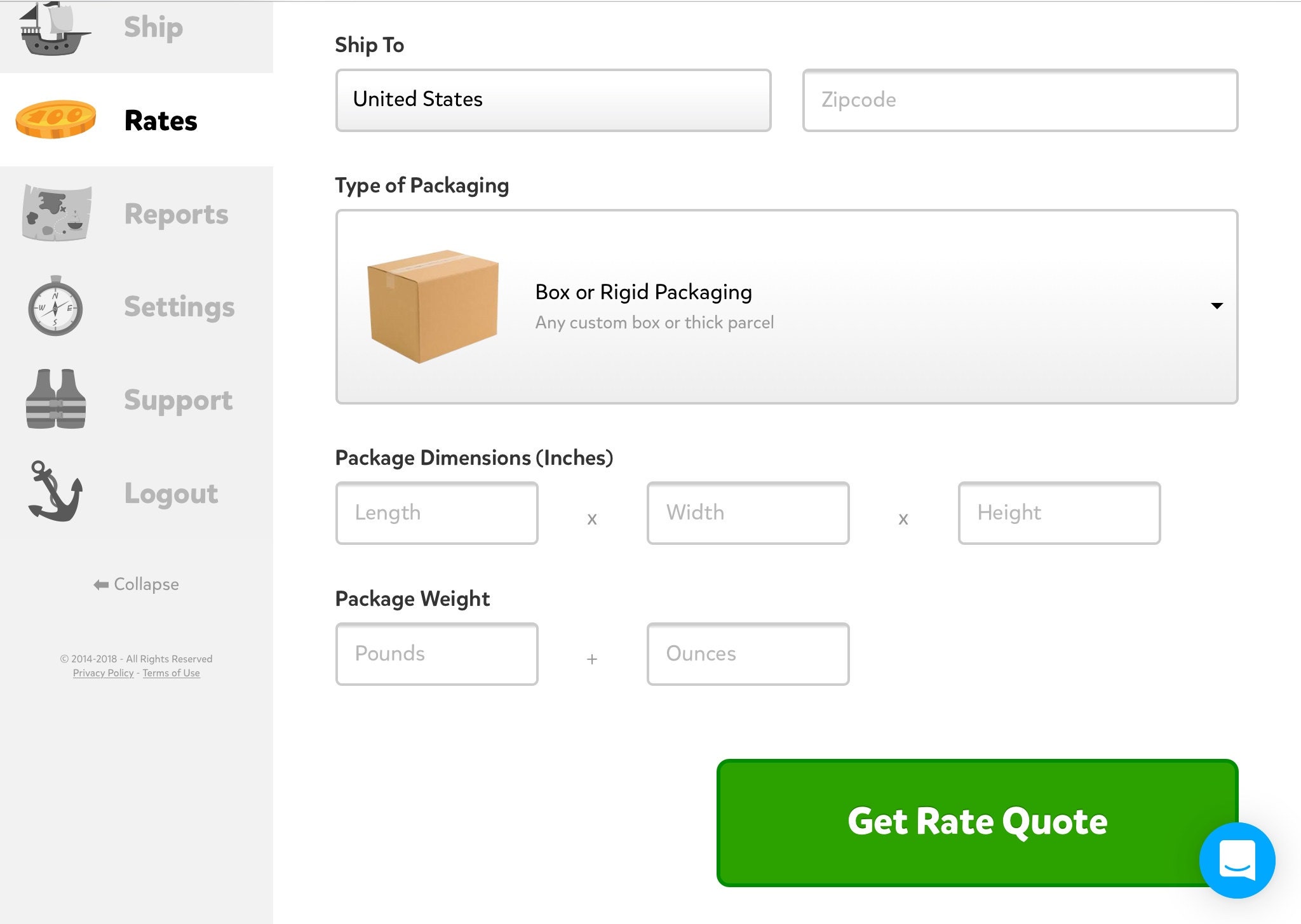

Pirate Ship interface screen
The interface is clear and easy.

  1. The rates are competitive. I save especially when shipping small, heavy items.
  2. Ability to combine some different selling venues into one shipping source, such as Etsy, eBay and Shopify.
  3. Pay with your credit card.
  4. It is simple to set up and use.
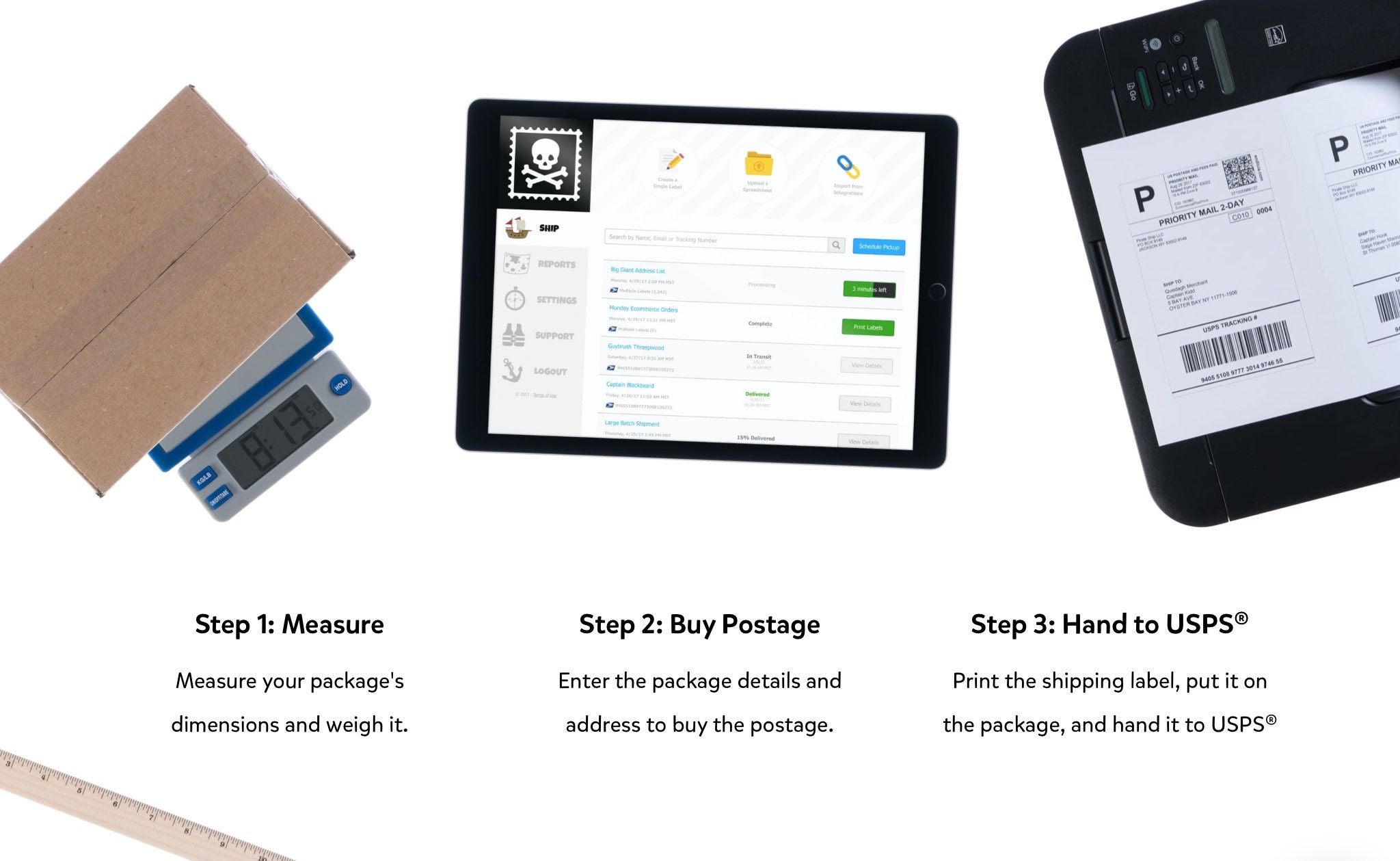
    Measure, Buy and Hand over to the UPSS
    Pirate Ship presents it as easy as 1 - 2 - 3
  5. Pirate Ship imports shipping details from Etsy, eBay and Shopify.
  6. After purchase, it marks orders as shipped on Etsy and other venues. 
  7. Setting up my Dymo 4XL was a breeze. 
  8. Included is up to $100 insurance. If you need additional insurance they use U-Pic which is 75c up to $50. 
  9. Pirate Ship has free chat support where you can ask questions. 
  10. You can pay for labels as you print them or you can pay in advance. 
  11. It is free!

Pirate Ship is easy to use
This will be my new go-to for personal packages. PayPal’s user interface for shipping has always left a lot to be desired...


Is it the very cheapest for every package?


The short answer is "no." If you ship primarily large packages such as 12x12x8" you will only save about 25 cents per package. First-class packages are the same as other venues. (This is in late 2018, before the new zoned first-class rates are implemented by the USPS.) 

Stay tuned for how it goes in 2019.

Cubic rates, the secret sauce of Pirate Ship


PirateShip uses cubic shipping rates when applicable. Cubic shipping is shipping by space and not weight. (Have you ever been disappointed that your heavy item was just a tad wrongly shaped to fit into a regional box?) Cubic rates are purely by size, maximum of 20 lbs.

Priority boxes are free


You probably already stock some priority boxes, right? Those Priority Mail boxes are in fact already set up for cubic mail. Here are some examples:

Box Dimensions Cubic Tier
1096L  9-1/4" x 6-1/4" x 2"       1
4 7" x 7" x 6"       2
1097 11-1/2" x 13-1/8" x 2-3/8"       2
1092 12-1/8" x 13-3/8" x 2-3/4"      3
1095 15-1/4" x 12-3/8" x 3"      4
Shoe Box  7-1/2" x 5-1/8" x 14-3/8"       4

If you do not have them, Priority boxes are free for the ordering from the USPS website. (Do not forget that USPS boxes can be cut down, possibly moving your package into a lower price bracket.)

More about cubic shipping


Skip this section altogether if you just plan on dropping your product details into Pirate Ship... This is the math for those who wonder how it works.

graphic of how to calculate USPS cubic rates
You can calculate cubic feet for yourself
To calculate the cubic pricing tier of your package:

Measure the outer length, width, and height of your package in inches (18" max in any dimension). 

If any of the measurements are over the nearest quarter inch, round down to the nearest 1/4" (for example, 5.6" inches becomes 5.5" inches).

Multiply the Length x Width x Height and divide the result by 1728.

The resulting number is the size of the package in cubic feet. Use the Priority Mail Cubic® rate chart to determine the pricing. 

(Be sure to round UP fractional results to the next tier... for example a package that is 0.24 cubic feet is in the 0.3 tier).


Here are the 2019 cubic rates for US mail:


Cu ft L, 1 & 2 Zone 3 Zone 4 Zone 5 Zone 6 Zone 7 Zone 8
0.10 6.95 7.28 7.49 7.65 7.82 7.99 8.25
0.20 7.34 7.68 7.91 8.12 8.40 8.61 8.92
0.30 7.79 7.99 8.27 8.92 10.18 10.73 11.39
0.40 7.95 8.27 8.63 9.50 11.79 12.94 14.79
0.50 8.07 8.56 9.13 10.34 13.95 15.75 17.91

What are the zones, anyway?


This great question was brought up by a reader of this blog post.

The USPS zones are based on where you ship from. They are different for almost everyone (if you have a different 3-digit zip, the first three digits of your zip code). To find out yours, go to the USPS at this link.

Type in the first three digits of your zip code; a chart will appear with your zones.

I keep a copy in my shipping room for reference.

What about International First Class Mail?


According to one seller, “after using Pirate Ship for 2-3 months, they offered me a lower rate tier for international first class. My rate for a 3 oz package to most countries is $9.95 and $7.95 to Canada.”

Pirate Ship told users on their website before the USPS increases in January, 2019:
“First Class Package International is no longer the cheapest way to ship packages that weigh less than 4 lbs internationally! If your business is expanding globally, just chat with us to get access to Simple Export Rate, which can save you up to 40%.”

What about paperwork?
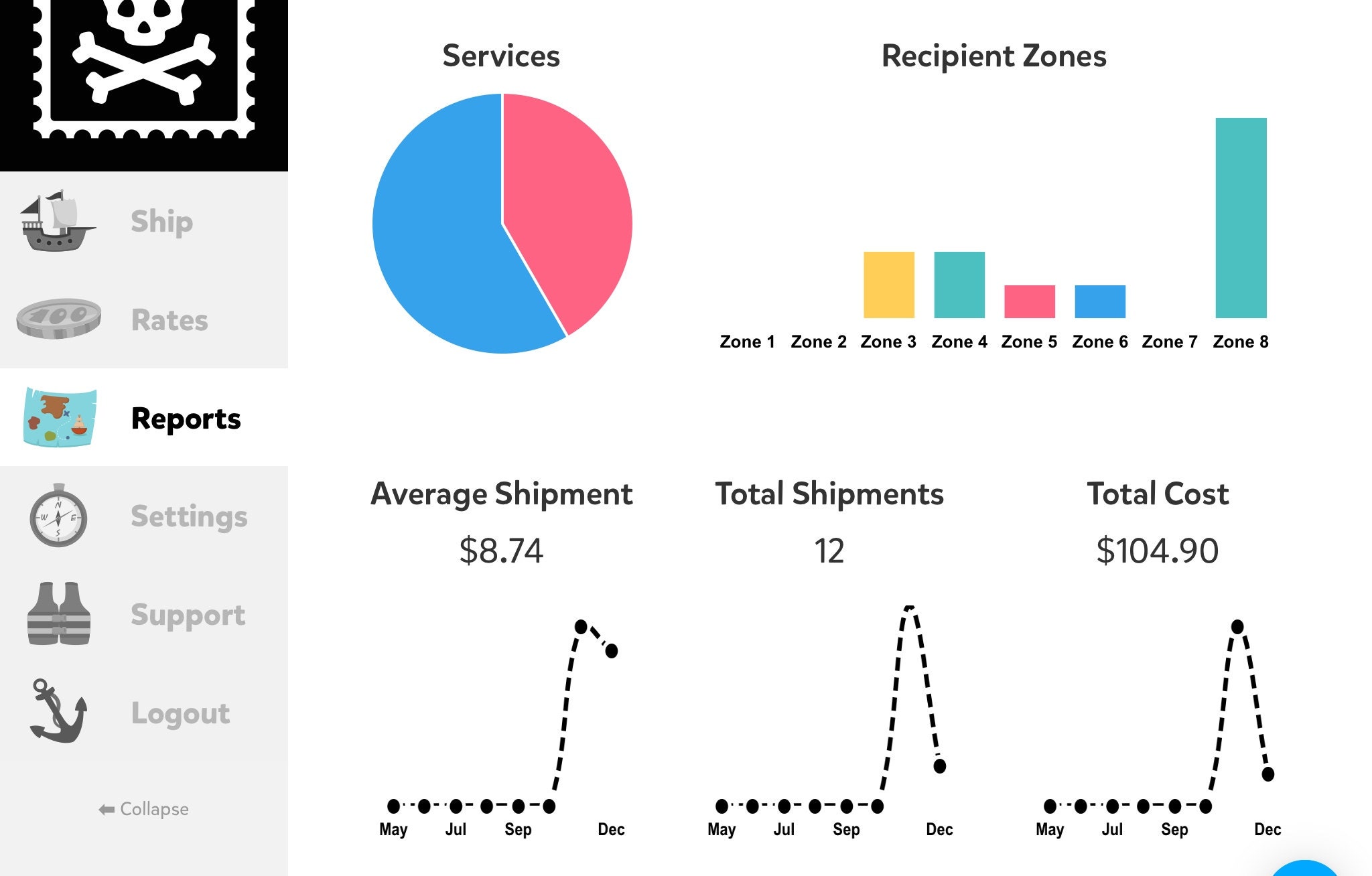

Pirate Ship has a tab for "reports" for bookkeeping


My husband was still skeptical. "How will this go come tax time?" He had a point.

I found the "reports" tab. It will be one more step, an additional calculations for taxes of course.

And they have these pretty data charts.
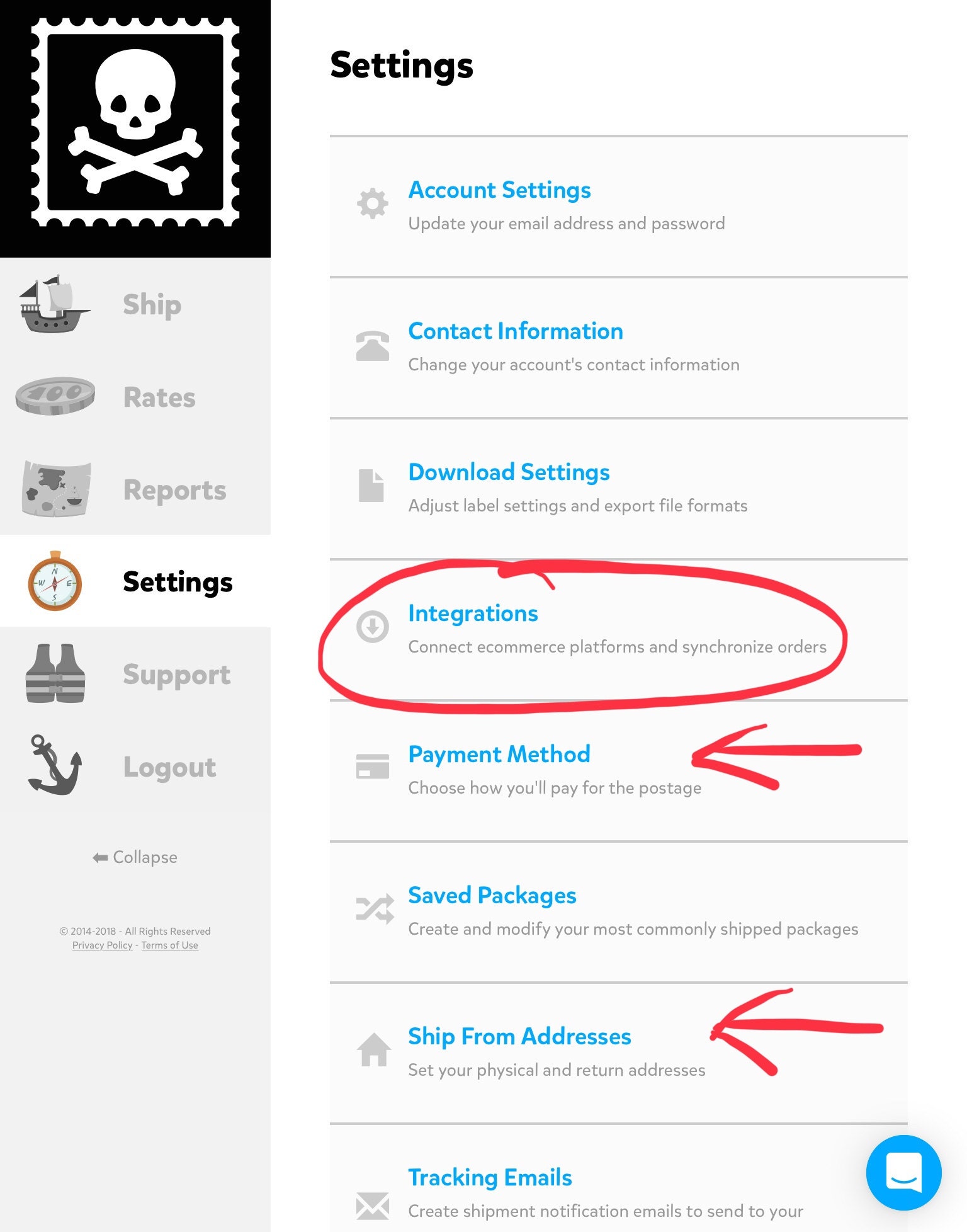

Pirate Ship is easy to integrate with your online venue

Is it easy to set up?


You must provide some basic information to Pirate Ship.

In order to access your account and pull your orders, you must grant them some access to your account (much like Foto Fuze if you have used that integration).

They will ask for a way to pay for the labels. (I have it set up much like EZ Pass and meter them out $20 at a time from my credit card.)

There are other things to set up like your return address, package templates and content of shipping emails.

Read here how to set up additional "ship from" addresses.


It seems too good to be true. How do they make money?


Their website explains:

“How can Pirate Ship possibly stay in business when it is 100% free while offering the deepest USPS® discounts available?

“The reality is we make our money just like any other shipping software company; through our official partnership with USPS®“


Package on manual scales
Online sellers need several tools in their shipping "box."


Tuesday, January 10, 2017

How can a tablet help my vintage Etsy business?

Manage Etsy business with electronic tablet
Is a tablet the best choice for your vintage selling business?
Perhaps you are holding back from getting a device. Too difficult to learn. Too expensive.

Do you own a smart phone already? Have you tried using that for your business? How does its size work? Once you wear bifocals, you may prefer a tablet. There are mini tablets that are a little smaller which may be another option.

When my husband and I decided to buy a tablet, we were not sure how much use we would really get out of it. Hence, we bought a basic model without cellular service.

After we found out we really liked it and can use it, we purchased another one, a basic one with cellular service. Finally now we own one with maximum storage, thin size and portability along with cellular service.

My experience 


As far as recommendations, I only have experience with the Apple iPad. It is very intuitive. I have a full-sized one so I can see it with my over-50 eyes.

Because I take a lot of photos, we eventually purchased an iPad with the most memory available and an upgraded iSight camera. A "mini" is also available, which some prefer.

Etsy shop update for VintageMaineia
Shop Update photo using a rustic Filters app
Models with cellular service are more expensive up front. Additionally, you will have to pay for monthly data. We already had a cell phone with a local carrier and we bundled the cellular service with that.

If you don't purchase cellular data, you will only be able to use your device at home (if you have WiFi) and in other locations with WiFi. There are many places with free WiFi like fast-food restaurants, malls and libraries.

Our most extreme need for WiFi was a vacation we took in a remote location on the Canadian border. There was no US data. In order to view my emails, we had to cross the border and go to a little town office in Quebec. That is an unusual situation.

We purchased our iPads through the local carrier so that they would work with the local carrier. A savvy millennial would no doubt be able to do it cheaper.

We have 2 GB of cellular data per month, which works for us. With 1 GB, I had to continually check our data use in "settings." With 2 I am good as long as I don't do any streaming or uploading photos.

If you live in an area with a lot of carriers, you will have more choices. I live in a rural area. We need reliable data service in that area, so we used the best local carrier. I am sure that there are better deals out there.

15 ways to use a tablet in your vintage Etsy business


How do I use my device? How do I love thee? Let me count the ways:
Sutton purse holding tablet
My Coach Sutton purse for auctions
  1. At auction to look up prices 
  2. At auction to photograph items. 
  3. While bidding at auction, refer to the pictures. (In my case so I know which tray lot I am bidding on.)
  4. I delete the photos that I don't use. The auction photos I save and record the price I paid for the item right on it for tax records.
  5. Taking listing photos. 
  6. Editing listing photos.
  7. Enhancing photos. (Example: an app called Filters which makes items look textured and/or vintage colored)
  8. Storing photos either on my tablet or in cloud storage.
  9. Shop dashboard. The new Etsy Shop Manager for the Sell on Etsy app is even better than the new interface for the PC. Our views and favorites are better showcased in my opinion.
  10. Composing listings. The app has been glitchy, so I often just use the regular web browser.
  11. Shop updates. (I even have used my auction photos.)
  12. Inventory management. I use Numbers on the iPad.
    numbers program vintage books
    Tablet used for inventory management
  13. While packing orders, I play movies with my device.
  14. Social media. I don't do much besides blogging. Even off line, I composed blog postings using Notes. (Blogger doesn't work well with a tablet.)
  15. Financial management. There are free and low-cost spreadsheet programs available. 

Apps for our tablets

Spreadsheet - Numbers
Camera - comes with the device (called Photos), also Yamera
Photo Editing - Photos, plus Photo Editor
Photo Enhancing (Filters and Vintage Coloring) - Photos, plus Filters
Adding Text and/or Graphics to Photos -  Photos, Canva, Photo Editor
Social Media - I'm not an expert
ITTT - If This Then That - free app to create chains of simple conditional statements that accomplish things.
DropBox - store, sync and share files
Cloud Storage - iCloud, OneDrive
Sell On Etsy app. Has been unreliable. Mostly use the website via Safari. Hopefully it has been improved with the new site improvement rollouts of February, 2017.

Accessories for Work

    Selling vintage using modern technology
  1. Absolutely buy a case. I have dropped my iPads numerous times. I have broken three cases, but not the tablets.
  2. Carrying one around. I use a vintage Coach bag. I have also used various other crossbody style bags.
  3. Camera lenses. Inexpensive on eBay. Close-up and fish-eye.
  4. Tripod adapter. Take another look at my setup for inventory management. My older iPad is attached to a tripod with an adapter that is available on eBay.
Internet service. If you use cloud storage such as iCloud or OneDrive, your photos will be uploaded and stored. That is a good thing. However, the process can take up a lot of bandwidth, slowing down your Internet WiFi service. We have just upgraded our Internet service at home from 3 to 25 mbps. That allows for streaming video on multiple devices.

We also pay for some extra cloud storage. Apple's is 99 cents per month.

So, have you been inspired at all to try out a tablet? I enjoy mine much more than I expected to: reading and working while we travel. Streaming movies while folding laundry. Video chatting with friends and family. Playing Spider Solitaire at bedtime...

Are you using a tablet to help run your Etsy business? Does it work well?

Friday, December 23, 2016

Why should you test search on Etsy? And how?

Vintage Maine License Plates
First page of search results: ads + one listing from every shop
Let's face it: Etsy sellers like to know how our items are positioned in searches compared to the competition. 

Especially if sales and views are down. Sellers try to assess what is going on and how to fix it.

Our position in search shifts all the time. Where are we today? Did we sell an item? (Bump up.) Did we get a bad review? (Bump down 😟). Etsy rotates shops around to different slots.

An added benefit is that we can see how our photo(s), our visual item presentation measures up. We see that when our items are viewed among the other offerings that buyers see when searching.

Basically we need to find one or 
more test search phrases. 


Find a test phrase


No, I can't tell you exactly how to find it. Just keep doing searches to survey how your different items fall within search.

A search should eventually present itself that will serve the purpose of a useful test search for you. If you're diligent and fortunate, more than one will work.


My test phrase


I'll share one of mine. I'm a vintage store in Maine. I sell vintage Maine license plates. "Vintage Maine License Plates" works as a test phrase for me. There are four pages of results right now. They are dominated by one seller with a lot of plates (not me). This shop uses the same background, so it is easier to see how my items are placed. There are four pages of total results. That is enough to be informational for me, without being overwhelming.


What we see in the test search, step by step:


What do we see here? Four ads along the top from the same seller (on a PC. The mobile device view is sneakier, with the ads more woven in and harder to ignore.)


After that, there are a bunch of plates from different sellers. I'm third in that pile. That's acceptable. (My position has changed since earlier today. Rotation I'm guessing. Or my bump up from a Maine license sale a couple of days is wearing off.)

(In the old days, each shop got one spot per page. Those days are over now that Etsy has implemented Artificial Intelligence. Clumping now reigns )

VintageMaineia vintage license plates
Bottom half of first page of search results
After the four ads (only present if a shop is paying for them) we can glean some more information. In my case, there is another shop's license plate. Then two of mine. Then it alternates: my shop, then another for a few slots. Then it's the dominant seller (also happens to be the advertising shop) in this search. So we are done with page one and on to page two.

ranking for vintage license plates
Page two of search results
What do we see here? After the featured items (all by that one seller) there are three shops before my item. Then another shop's item followed by one of mine. Then it's (snooze) that same seller, all the way to the bottom of the page.

More of the same on page three. Nothing exciting to see. And page four. I have one item about 1/4 the 
way down on each of those pages.


Alternate methods:


Another way to test search is to use an app like EtsyGadget.com. You add your search terms into the field. After a short wait, out pops "best tags for search tag 'vintage Maine license plate.'" There can be some useful alternate tagging ideas. After that is a breakdown of where we fall in search results.

Rather than the visual search method I just described, this is written: "position 34 on page number 1." Some sellers prefer it this way. Hard (written) data can be kept and referred to over a period of time.

A great brand-new way to do this is through EtsyRank. They have released a new app (the day after I first posted this blog, in fact.) It is called the "Monitor Tool."

From developer Anthony: "With the Monitor tool you can see what pages your listings are found on. You specify your most important search terms and every hour EtsyRank will update the report and store the rankings for up to a week."

Instead performing your search over and over and visually remembering it, or receiving numerical positions, EtsyRank's tool gives you a graph that shows the "rise and fall" of your rankings:
EtsyRank monitor search tool
Graph for the Vintage Maine License Plate search

My graph is for the same license plate search. It will work better for a broader search. I'll be trying that next.

Right now, EtsyRank's Monitor Tool can only be used to check up on one keyword phrase. There are plans to expand that in the future. I will still be searching manually.


How often should I test search?


Once you have found a good test search or two, perform them. Repeatedly. Early in the day, later in the day, every day. Try it on different devices. Try it on a device someone else is using. The more you do it, the more you can see and learn. You might be surprised.


Or if you're using an app, let them do the tests. You do need to review the data periodically. On EtsyRank, that's every week at least, which is as long as they keep the data. 


Expect to see movement


Etsy's algorithm changes up results all the time. Even the relative positions of my own items to each other will vary. On the graph, you can see my items changing position.


Here are some questions you will want to note the answers to:
  1. What happens when you renew an item? 
  2. What happens when another shop renews their item? 
  3. What happens when you sell this type of item?
  4. How different are the results in incognito mode?
It is important to understand what we are seeing in Etsy's search results, and why. My next post will get into that some more. We will delve a bit into the Algorithm. Are you ready?

Selling vintage in uncertain times

With coronavirus, we have seen supply chain disruptions, stock market fluctuations, even companies temporarily stopping business. The news s...